Building Canopy: A Native GitHub Inbox and a Testbed for Lists
12 min read
Canopy is open source at github.com/Iron-Ham/Canopy. Lists is at github.com/Iron-Ham/Lists.
Why a GitHub Inbox
GitHub’s notification system is one of those things that works well enough that nobody builds an alternative, but poorly enough that power users route around it. If you work on a large codebase with a high-traffic monorepo, the web inbox becomes a firehose. You can’t filter by CI status. You can’t see review decisions inline. You can’t triage in bulk without clicking through every thread. You can’t query your notifications from an AI agent.
I’ve been building list-heavy apps professionally for years, and I recently shipped Lists, a high-performance diffable data source framework. I needed a real app to stress-test it — something with grouped sections, mixed cell types, swipe actions, context menus, pull-to-refresh, and keyboard-driven multi-selection. A GitHub notification client hits every one of those requirements. So Canopy started as a testbed for Lists and turned into a tool I use every day.
The Architecture
Canopy is a native macOS app built with UIKit via Mac Catalyst. Not SwiftUI. Not AppKit. This might sound unusual for a Mac app, but it’s deliberate: Lists is a UIKit framework, and I wanted to exercise its full API surface — UICollectionView compositional layouts, diffable data sources, swipe actions, context menus, and the cell lifecycle. SwiftUI’s List would hide all of that behind an opaque abstraction.
The app is a triple-column UISplitViewController:
- Sidebar — filter presets (Important, Notifications, My Issues, My Pull Requests, Archive) with live badge counts, powered by an
OutlineList - Notification list — grouped by repository, with filters for type, reason, and read state, powered by a
GroupedList - Detail pane — rich thread view with CI status, review decisions, labels, participants, rendered body HTML, and an activity timeline
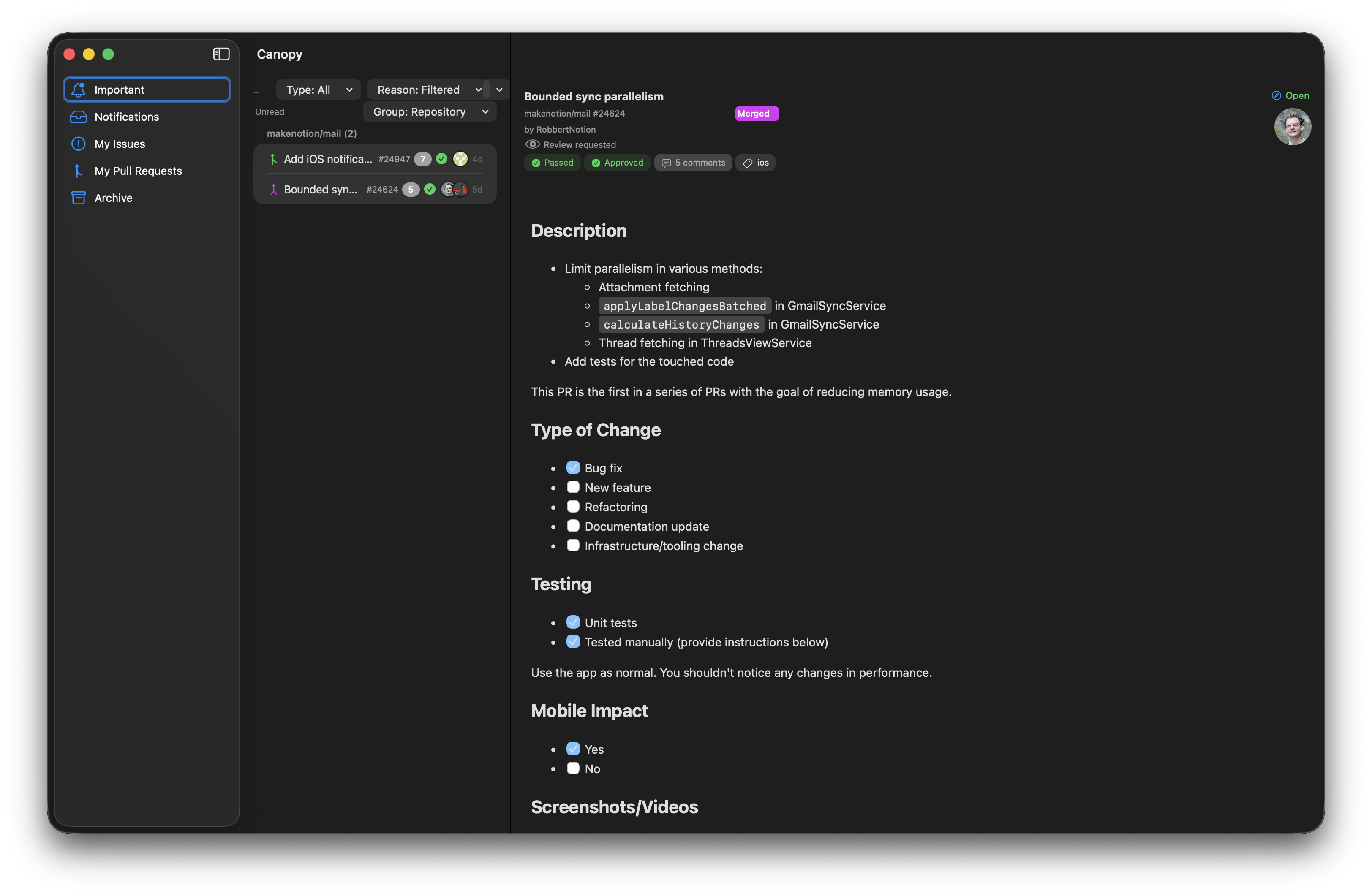
Each column is its own Swift module. The app uses strict modular architecture with Tuist: a pure Domain module for value types, Networking for REST + GraphQL, Persistence for SQLite via GRDB, CanopyUI for the design system, and feature modules for each column. No module imports UIKit unless it needs to render something.
Lists in Practice
I wrote a deep dive on Lists that covers the performance characteristics and API design. Building Canopy put all of that to the test with real data.
Grouped Notifications
The notification list is a GroupedList<String, NotificationCellViewModel>. Notifications are sectioned by repository, and each section collapses and expands. The data flow is straightforward: fetch notifications, map them to view models, apply the snapshot.
let grouped = GroupedList<String, NotificationCellViewModel>(appearance: .plain)

await grouped.setSections(
    notifications
        .grouped(by: \.repository.fullName)
        .map { repo, threads in
            SectionModel(
                id: repo,
                items: threads.map(NotificationCellViewModel.init),
                header: repo
            )
        }
)
What I wanted to validate was how Lists handles the common notification inbox pattern: frequent incremental updates (new notifications arriving via polling), bulk mutations (mark all as read), and large section counts (I follow dozens of repos). The per-section diffing in ListKit means that when three new notifications arrive in one repo, only that repo’s section gets diffed. The other sections are identity-checked and skipped. This is exactly the behavior I designed for, and seeing it work in a real app with real data confirmed the architecture.
Swipe Actions and Context Menus
Triage is the core interaction in a notification inbox. You need to archive, mark read, save, and unsubscribe — fast and without leaving the keyboard. Lists exposes these through typed closure APIs:
grouped.trailingSwipeActionsProvider = { [weak self] item in
    UISwipeActionsConfiguration(actions: [
        self?.archiveAction(for: item),
        self?.toggleReadAction(for: item),
    ].compactMap { $0 })
}

grouped.contextMenuProvider = { [weak self] items in
    self?.buildContextMenu(for: items)
}
The context menu provider receives the full selection when you right-click within a multi-selection. This was one of those features where the API designed for a generic use case mapped perfectly onto the specific need: right-click on one of five selected notifications, and the context menu operates on all five. No special handling required.
Keyboard-Driven Multi-Selection
Canopy is keyboard-first. Cmd+E archives, R toggles read state, S saves, Cmd+Shift+A marks all read, Cmd+O opens in the browser. Multi-selection works with Shift+Click and Cmd+Click, and all actions operate on the full selection. This is standard UICollectionView behavior that Lists preserves without getting in the way — the data source handles the diffing, the collection view handles the selection, and the feature code handles the actions.
The GitHub API Gap
This is where things got interesting. I’ve worked with GitHub’s internal APIs, so I had expectations about what the public API could do. Some of those expectations were wrong.
What the REST API Gives You
GitHub’s notifications endpoint returns a list of NotificationThread objects. Each one tells you: the repository, the subject (title, type, URL), the reason you were notified, whether it’s unread, and when it was last updated.
That’s it. No PR state. No CI status. No review decisions. No labels. No participants. No body content. The subject URL points to the API resource (a pull request or issue), but the notification itself is a shallow envelope. You know that you were notified about a PR, but not whether it’s passing CI, whether it’s been approved, or what it says.
For a triage-focused inbox, this is a serious gap. The whole point of triage is deciding which notifications need your attention without opening each one. If you can’t see that a PR is already merged, or that CI is failing, or that a review was approved, you’re back to clicking through every notification — which is the exact problem the app is trying to solve.
GraphQL Fills the Gaps
The solution is a two-layer approach: REST for notification CRUD (listing, marking read, archiving), and GraphQL for enrichment (PR state, CI status, review decisions, labels, participants, rendered HTML bodies, timeline events).
query FetchPullRequest($owner: String!, $repo: String!, $number: Int!) {
  repository(owner: $owner, name: $repo) {
    pullRequest(number: $number) {
      state
      isDraft
      reviewDecision
      commits(last: 1) {
        nodes {
          commit {
            statusCheckRollup {
              state
            }
          }
        }
      }
      labels(first: 10) { nodes { name, color } }
      participants(first: 10) { nodes { login, avatarUrl } }
      bodyHTML
    }
  }
}
This works, but it’s not free. Each notification requires a separate GraphQL query to enrich. For 50 notifications across 20 repositories, that’s 50 additional API calls. Canopy caps concurrent enrichment at 50 requests and treats failures as non-fatal — if enrichment fails for a thread, the UI shows the notification without the rich metadata. It still works; it’s just less useful.
What’s Surprising
What surprised me wasn’t that the REST API is sparse — notification APIs are often minimal. What surprised me is how much of this data has been available internally for years. The CI status rollup, the review decision enum, the participant list — these are all first-class concepts in the internal GitHub API. They’ve powered the internal notification experience for a long time. The public GraphQL API exposes them, but the notification REST API never incorporated them. The result is that building a rich notification client on the public API requires stitching together two different API paradigms (REST and GraphQL) with different authentication models, rate limits, and failure modes.
It’s a reminder that API gaps aren’t always intentional design decisions. Sometimes the internal tooling moves faster than the public surface, and the delta grows until an external developer tries to build something that exercises the gap.
The Polling Problem
There’s no WebSocket or webhook-based push for user notifications. You poll. The REST API returns an X-Poll-Interval header (typically 60 seconds) that tells you how often to check. Canopy respects this, and uses If-Modified-Since headers to avoid re-fetching unchanged data (the API returns 304 Not Modified). But the fundamental model is still poll-based.
This means there’s an inherent latency between when a notification is created on GitHub and when it appears in Canopy. For most workflows this is fine — a 60-second delay on a notification is rarely meaningful. But it’s a constraint worth knowing about, especially if you’re building something where real-time matters.
The MCP Server
This is the part that excites me most. Canopy ships with a companion CLI tool called canopy-mcp that implements the Model Context Protocol. This means any AI agent that speaks MCP — Claude Code, for example — can query your GitHub notifications, read thread details, and triage your inbox programmatically.
How It Works
The MCP server runs in two modes:
Relay mode: When Canopy.app is running, the CLI discovers it via a port file and connects over TCP localhost. All MCP requests are forwarded through the app, which means the agent sees the same enriched data as the UI, and actions (mark read, archive) are reflected in the app immediately.
Headless mode: When the app isn’t running, the CLI operates standalone with its own database, REST/GraphQL clients, and background polling. It shares the same Keychain token stored by the app, so there’s no separate authentication step.
Resources and Tools
The MCP server exposes GitHub notifications as resources:
canopy://notifications— your full inboxcanopy://notifications?filter=important— review requests, mentions, assignmentscanopy://notifications?filter=my-prs— PRs you authoredcanopy://summary— a dashboard with counts by category, reason, and repocanopy://notifications/{id}— individual thread detail with GraphQL enrichment
And tools for triage actions:
mark_read— mark notifications as readmark_done— archive notificationssave/unsubscribe— save for later or unsubscribe from a threadmark_all_read— bulk mark-read with optional filter
Prompts for AI Triage
The MCP server also ships two built-in prompts:
triage guides an agent through categorizing notifications into “read now,” “save for later,” and “archive.” The prompt includes context about notification reasons and types so the agent can make informed decisions.
daily_summary generates a morning briefing: an overview of what’s new, which items need attention, recent activity on threads you’re following, and cleanup candidates for archiving.
The result is that you can start your day by asking Claude Code to summarize your GitHub notifications and triage the obvious ones. Review requests go into “read now.” Merged PRs where you were just CC’d get archived. CI failure notifications on your own PRs get flagged. The agent does the mechanical sorting, and you focus on the threads that actually need your judgment.
Why MCP
I chose MCP over a custom API because MCP is a protocol, not a platform. Any MCP-compatible client can use Canopy’s server without Canopy-specific integration code. Today that’s Claude Code. Tomorrow it could be any agent framework that adopts the protocol. Building on MCP means the notification data and triage tools are available to whatever AI tooling the ecosystem converges on, rather than locked into a single agent.
The relay architecture — where the CLI forwards to the running app over localhost — also solves a real problem: keeping the AI agent’s view of your notifications in sync with the UI you’re looking at. When Claude Code archives a notification through MCP, it disappears from the app. When you archive something in the app, the next MCP resource fetch reflects it. There’s one source of truth (the app’s database), and the MCP server reads from and writes to it.
What I Learned
Building Canopy reinforced a few things and taught me a few new ones.
Lists works as designed. The grouped notifications list with swipe actions, context menus, multi-selection, and pull-to-refresh exercises almost every feature in the framework. The performance characteristics match the benchmarks: incremental updates are fast, no-change applies are effectively free, and the per-section diffing strategy pays off when only a few repos have new activity. I found a handful of API ergonomic issues along the way and filed them as issues on the Lists repo — this is exactly what a testbed is for.
UIKit on Mac via Catalyst is underrated. The triple-column split view, keyboard shortcuts, context menus, and toolbar integration all work well. Mac Catalyst gets a bad reputation because early apps felt like phone apps on a desktop. But if you’re building with UICollectionView and compositional layouts from the start, the result feels native. The key is designing for the platform’s interaction model (keyboard-first, multi-select, context menus) rather than porting a touch-first design.
GitHub’s API tells you to build two clients. You need REST for notification lifecycle and GraphQL for everything else. This isn’t necessarily bad — it lets you ship a functional app quickly (REST only) and add richness incrementally (GraphQL enrichment). But it’s a design constraint you should know about before you start.
MCP is the most interesting part. Giving an AI agent structured access to your notifications with triage tools opens workflows that a GUI alone can’t match. The agent can process 50 notifications in seconds, applying consistent triage rules that would take you minutes of manual clicking. And because it’s MCP, you get this for free with any compatible agent — no plugin architecture, no custom integration.
Try It
Canopy is open source: github.com/Iron-Ham/Canopy. It requires macOS Tahoe and a GitHub OAuth token. The MCP server can be configured in Claude Code’s settings to give your agent access to your notifications.
If you’re building list-heavy UIKit or SwiftUI apps and you’ve felt the friction of Apple’s diffable data sources, take a look at Lists. The companion blog post covers the performance story in detail, and Canopy is a working example of what a real app built on Lists looks like.